How to export through a VPN
A built-in VPN lets you route exports through a country near the source — recommended for Facebook and geo-restricted content. Here's how to pick a location and export.
Exporting comments from a private group or a busy page works best when your requests come from a sensible location. ExportComments has a built-in VPN so you can route an export through a country near the source — no separate VPN app, no setup, just a dropdown.
Why export through a VPN
When you export login-gated content, the platform sees where the request originates. If that's nowhere near where you normally sign in, it can ask you to reconfirm your identity. Routing through a VPN location close to the content keeps things smooth.
- Avoid identity re-checks — a location near you is strongly recommended for Facebook exports.
- Region-locked content — reach country-specific posts and geo-targeted ads.
- Zero setup — it's built in; pick a country and go.
The VPN is a paid feature, available on the Premium and Business plans.
How to export through a VPN — step by step
- Paste your URL on ExportComments.com and open Advanced Mode.
- Expand Network Options and switch to the Use VPN tab.
- Pick a country from the searchable list — each shows how many servers are available. Choose the location nearest the content's audience.
- Add any authentication you need (your session cookies) and click Start Export Process.
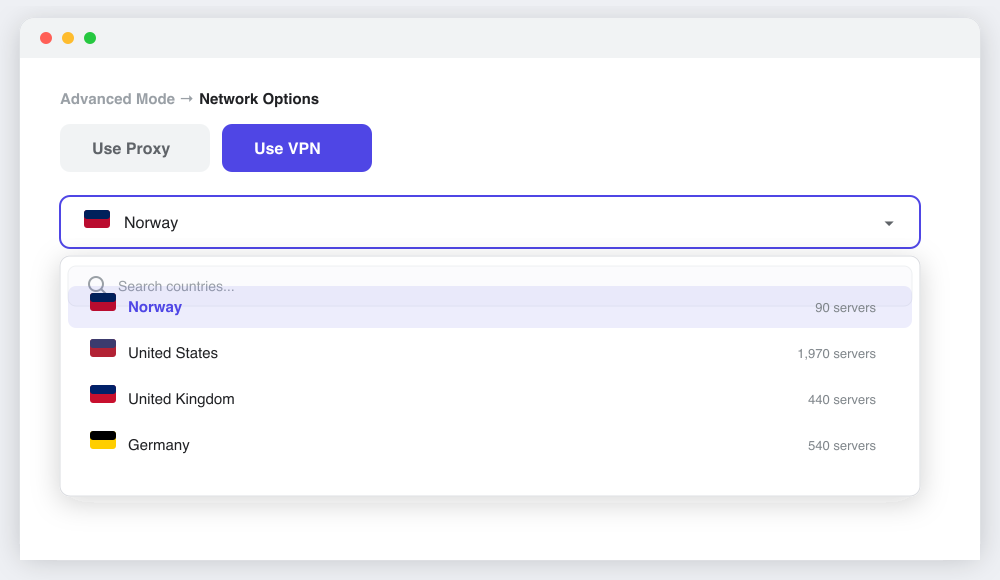
VPN or proxy — which should I use?
The same Network Options panel offers a Use Proxy tab too. Use the built-in VPN when you simply want requests to originate from a specific country and don't want to source anything yourself. Use a proxy pool when you have your own proxies and want rotation across many addresses for high-volume jobs. You pick one or the other per export — not both.
Use it responsibly
A VPN changes where your export comes from — it doesn't make you anonymous. For login-gated exports you're still sending your own session cookie, which identifies your account. Running many exports in a short window can still look like suspicious behavior and get an account flagged, so keep things reasonable. A VPN may also add a little time to an export while the connection is established.
Plan limits & API access
Results per export by plan: Free 100 / Personal 5,000 / Premium 50,000 / Business 250,000. See Pricing. You can also set a location through the REST API by passing the country name on any job, e.g. {"options": {"vpn": "Norway"}}.
FAQ
- Do I need my own VPN subscription?
No — the VPN is built into ExportComments. Just pick a country from the dropdown. - Which country should I choose?
The one nearest the content's audience. For Facebook in particular, a location near where you normally log in is strongly recommended. - Will a VPN make my export anonymous?
No. It only changes your request origin. Authenticated exports still use your own session cookie, which identifies your account. - Can I use a VPN and a proxy together?
No — they're alternatives in the same Network Options panel. Choose one per export. - Why is my VPN export slower?
Establishing the VPN connection adds a little overhead, and availability varies by server load. Use it when you need region control, not on every job.